How to hold a contractor accountable for defective work.
When a wall cracks, a roof leaks, or waterproofing fails within a year of completion, you need more than a phone call — you need documented evidence, a formal demand, and a timestamped record that can go to small claims court or a contractor licensing board.
Dated photos and written defect descriptions
Cracks, spalling, and structural movement change over time. Documenting the defect on the day you find it — with a photo and timestamp — establishes the timeline the contractor cannot later dispute.
Warranty and contract attached as exhibits
Upload the original contract, warranty language, and any invoice. These become numbered exhibits in your PDF demand — exactly what a judge or licensing board asks for.
AI-drafted demand letter, not an angry text
SettleBot writes a calm, professional demand that cites the warranty, lists the defects, and gives the contractor a clear deadline to respond — on the record.
Contractors count on you not having documentation.
A verbal warranty is hard to enforce. Even a written one goes nowhere if you can't prove when the defect appeared, what you said, and when you said it. Most warranty claims fail not because the claim is wrong — but because the paperwork isn't there.
Contractors promise to "come take a look" and never show. Without a written demand and a deadline, there's no paper trail — and no leverage.
"That crack was there before we finished" is easy to claim when there are no dated photos. A timestamp from the day you found it shuts that argument down.
If you had to hire someone else to fix what the first contractor should have covered, you now have damages. Without a written record, recovering that cost is nearly impossible.
A warranty claim is only as strong as the paper behind it. SettleBot turns your photos, dates, and contract into a formal demand the contractor can't ignore.
Create a claim and enter the contractor's information.
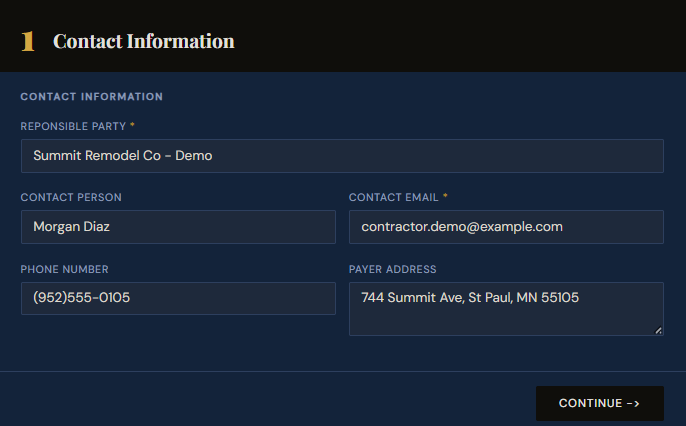
Start a new SettleBot claim and enter the contractor's business name, contact person, email, phone, and address. This information becomes the header of your formal demand and establishes exactly who you're holding accountable — on the record.
Having the contractor's full contact information in the claim means any escalation — a licensing board complaint, a court filing, a certified letter — flows directly from what you've already documented here.
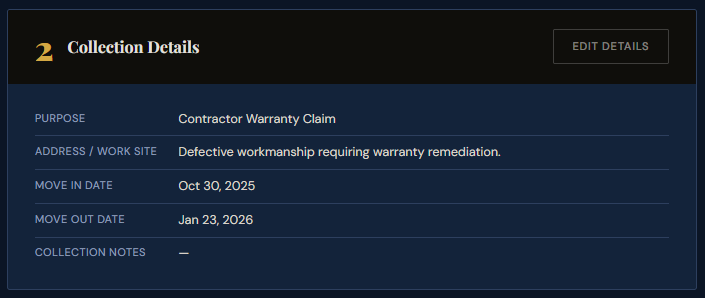
Set the work site, claim purpose, and project dates.
Enter the property address, select Contractor Warranty Claim as the purpose, and set the project start and completion dates. These dates are critical — they establish how long after completion the defect appeared, which is exactly what a warranty dispute turns on.
SettleBot uses this information to frame the demand professionally. The claim references specific dates the contractor cannot dispute because they came from their own project record.
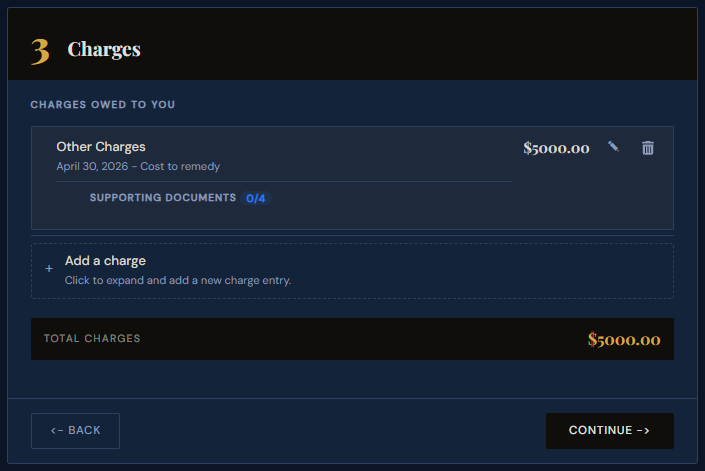
Add the estimated or actual repair cost as a charge.
Enter the cost to remedy as a charge. If you've already paid a second contractor to fix the defect, use their invoice amount and attach the receipt. If you're still in the demand phase, use a written estimate from another licensed contractor — this establishes a concrete dollar amount the original contractor must respond to.
SettleBot shows a running total the contractor sees in full. A specific dollar figure makes it harder to stall — they know exactly what honoring the warranty costs versus what ignoring it risks.
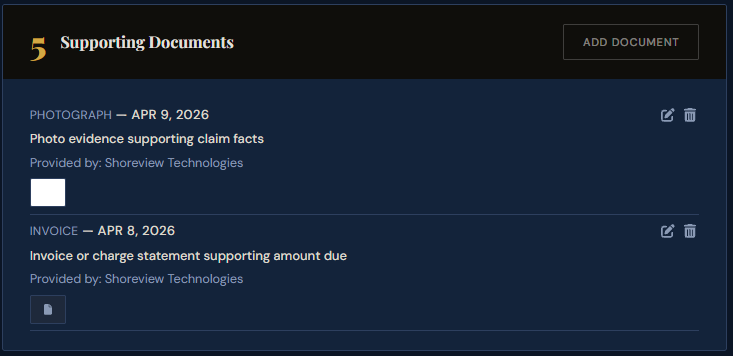
Attach your contract, warranty, photos, and invoice as exhibits.
Upload your original contract or scope of work, the warranty document (or any text or email where the contractor referenced it), defect photos with dates, and the invoice showing what you paid. SettleBot assigns each file a numbered exhibit that appears automatically in the PDF demand.
Exhibits are permanently linked to the claim. A judge, mediator, or contractor licensing board can see every document in the order you attached it — no separate binder required.
Generate a formal PDF warranty demand.
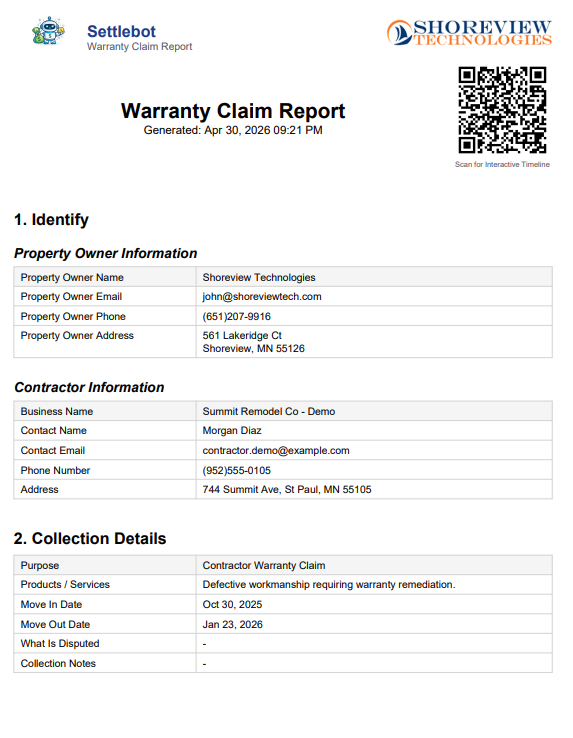
SettleBot compiles every charge, exhibit, and date into a professionally formatted PDF — the kind of document that shows a contractor (and a judge) that you are organized and serious about enforcing this warranty.
The PDF includes the original contract date and amount, the work site, each defect with supporting photos, the repair cost, and all exhibits in order. It reads like a legal exhibit package — because that's what it is.
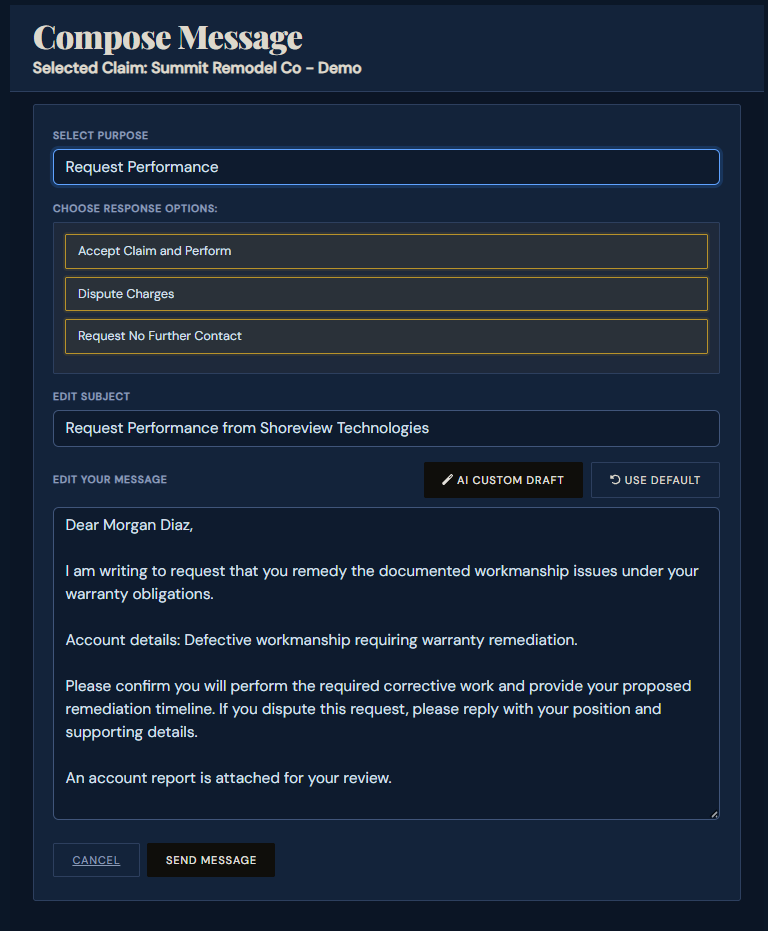
SettleBot's AI writes and sends the formal warranty demand.
You don't write the letter. SettleBot's AI generates a professional, factual demand citing the warranty, referencing the exhibits by number, and setting a clear deadline for repair or reimbursement. Choose the purpose — Request Performance or Dispute Charges — and the AI drafts accordingly.
The contractor receives the message with a unique response link. They can review the full documented claim, respond in writing, or propose a resolution — all of it logged automatically.
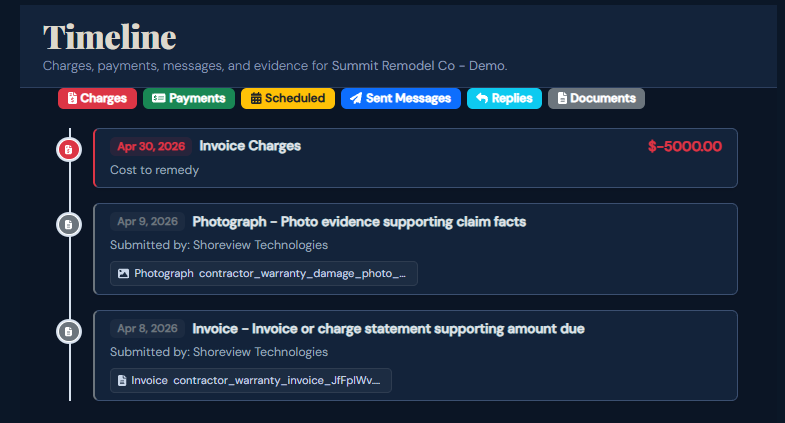
Every charge, document, and message is logged — ready for court.
The timeline captures everything: charges, uploaded documents, sent messages, and contractor replies — all timestamped in a single view. If the contractor claims they never received the demand, or that they agreed to something different, you have the record to prove otherwise.
If the contractor ignores the demand or refuses to honor the warranty, SettleBot's final report consolidates the full timeline into one document for small claims court or a contractor licensing board complaint.
Documented warranty claims don't get ignored.
Contractors delay when they sense ambiguity. When you show up with timestamped photos, a referenced warranty, a cited repair estimate, a professional demand letter, and a full communication log — there's no ambiguity left. The conversation shifts from "we'll get to it" to "what do we need to do to resolve this."
"The contractor came out the following week after we sent the SettleBot demand. Seeing everything documented with exhibit numbers made it clear we weren't going away."
Free to try · $17 per claim to send · No subscription
Common questions about contractor warranty claims
Upload any text messages, emails, or photos of signage where the contractor referenced a warranty. Even partial documentation of a warranty promise can support your claim. Attach it as an exhibit and let the demand letter reference it.
No. They receive a plain email with a unique link. They can review the full documented claim, respond in writing, and upload their own evidence — no account required.
Enter the repair invoice as a charge and attach it as an exhibit. This becomes the basis of your reimbursement demand — you're not asking for an estimate, you're showing documented out-of-pocket costs.
Yes, and SettleBot's report works for both. Contractor licensing board complaints typically require the same documentation — contract, photos, communications, and a written demand. The PDF gives you all of it in one place.
This varies by state and contract type, but most statutes of limitation on contractor work run 3–6 years. Start documenting now — delay weakens your case, and photos taken today are more credible than photos taken after a dispute begins.
Your SettleBot record still matters. Many states have contractor recovery funds or bonding requirements you can file against. A court judgment entered against a dissolved LLC can sometimes be collected against the principals personally. Your documentation is the foundation of any of these paths.
Document your warranty claim the right way — today.
Set up your first case in minutes. Enter the defects, attach your contract and warranty, and let SettleBot write the formal demand — with a complete exhibit package ready for court if needed.